
Introduction
If you spend 6–10 hours a day sitting—whether in an office in Ahmedabad or working remotely from home—there’s a high chance you’ve experienced back pain from office chair use.
This is one of the most common problems among IT professionals, freelancers, and desk workers across India. Long sitting hours, poor posture, and non-ergonomic chairs are silently damaging your spine.
The good news? Most cases of office-related back pain are preventable and reversible with simple changes.
This guide will show you exactly why it happens and how to fix it—starting today.
Table of Contents
- Why Your Office Chair is Causing Back Pain
- What Causes Back Pain From Office Chair?
- Common Mistakes in Sitting Posture
- How to Fix Back Pain (Practical Solutions)
- Best Sitting Posture Guide (Step-by-Step)
- Exercises & Stretches for Relief
- How to Choose the Right Office Chair
- When to See a Doctor
- FAQs
- Conclusion
Why Your Office Chair is Causing Back Pain
Your office chair isn’t always the problem—it’s how you use it.
In many Indian workplaces, chairs are not designed ergonomically. Add long hours, minimal movement, and improper posture, and it creates a perfect recipe for lower back pain office work issues.
Key reasons:
- Sitting for long hours without breaks
- Slouching or leaning forward
- Poor lumbar (lower back) support
- Incorrect screen height
Even expensive chairs can cause pain if used incorrectly.
What Causes Back Pain From Office Chair?
1. Prolonged Sitting
Sitting increases pressure on your spine compared to standing.
2. Poor Posture
Slouching leads to bad posture back pain, especially in the lower back.
3. Weak Core Muscles
Your spine depends on surrounding muscles for support. Weak muscles = more strain.
4. Lack of Movement
Staying in one position reduces blood flow and causes stiffness.
5. Improper Chair Design
Chairs without lumbar support increase the risk of back pain from sitting all day.
Common Mistakes in Sitting Posture
Avoid these daily habits that worsen back pain from office chair:
- Sitting on the edge of the chair
- Crossing legs for long periods
- Leaning forward toward the screen
- Not using backrest support
- Keeping screen too low or too high
Even small posture mistakes can lead to chronic pain over time.
How to Fix Back Pain (Practical Solutions)

1. Follow the 30-30 Rule
Every 30 minutes, stand or stretch for 30 seconds.
2. Adjust Your Chair Height
Your feet should be flat on the floor, knees at 90°.
3. Use Lumbar Support
Use a cushion if your chair doesn’t support your lower back.
4. Keep Screen at Eye Level
Prevents forward neck bending.
5. Stay Active
Include walking or light exercise in your daily routine.
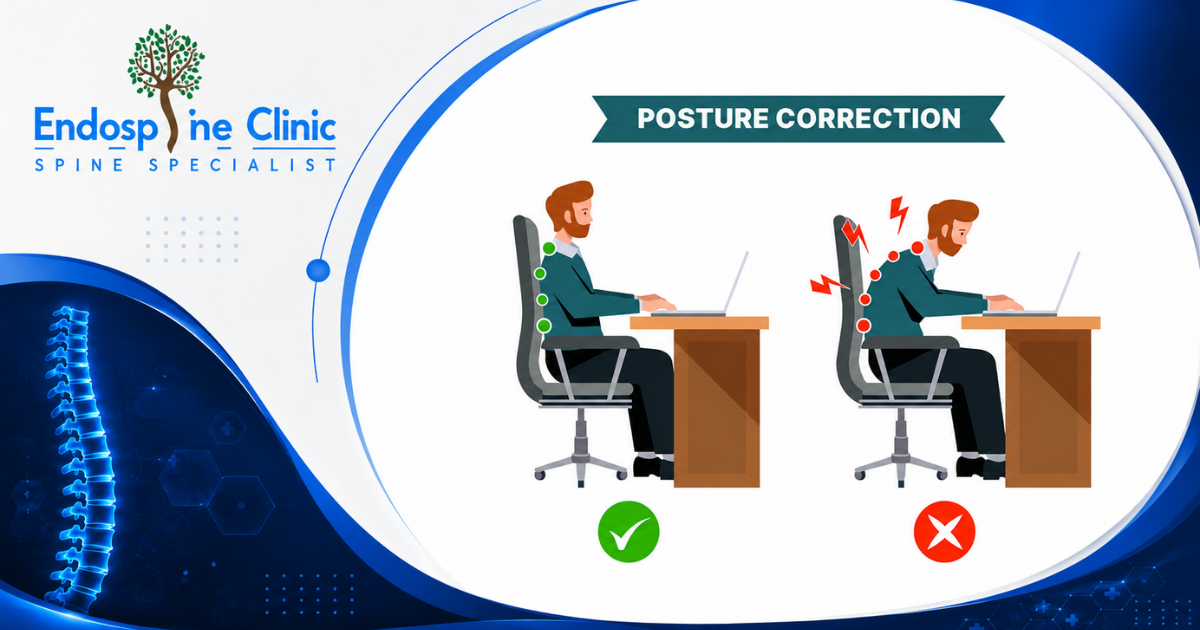
Best Sitting Posture Guide (Step-by-Step)
Follow this ideal posture setup:
Step 1: Sit Fully Back
Your hips should touch the backrest.
Step 2: Maintain Neutral Spine
Keep a natural curve in your lower back.
Step 3: Feet Flat on Floor
Avoid dangling feet or crossing legs.
Step 4: Relax Shoulders
Don’t hunch or raise them.
Step 5: Screen Alignment
Top of screen should be at eye level.
Step 6: Elbow Position
Keep elbows at 90° angle.
This posture reduces strain and prevents back pain from sitting all day.
Exercises & Stretches for Relief
Simple daily exercises can reduce stiffness and improve flexibility.
1. Seated Spinal Twist
- Sit straight
- Twist gently to one side
- Hold for 10 seconds
2. Cat-Cow Stretch
- Improves spine flexibility
3. Hamstring Stretch
- Reduces lower back tension
4. Shoulder Rolls
- Relieves upper back stiffness
5. Standing Back Extension
- Counteracts prolonged sitting
How to Choose the Right Office Chair
Not all chairs are equal. Here’s what to look for:
Essential Features:
- Adjustable height
- Lumbar support
- Breathable material
- Adjustable armrests
- Reclining function
Ergonomic Chair Benefits:
- Reduces spinal pressure
- Improves posture
- Prevents fatigue
- Enhances productivity
Investing in the right chair is crucial for preventing lower back pain office work problems.
When to See a Doctor
Consult a specialist if you experience:
- Pain lasting more than 2 weeks
- Tingling or numbness in legs
- Severe or worsening pain
- Difficulty standing or walking
Early diagnosis can prevent serious conditions like slipped discs or nerve compression.
FAQs
Q1. Can an office chair really cause back pain?
Yes, improper sitting and poor chair support are major causes of back pain from office chair.
Q2. How can I get relief from office chair back pain?
Use ergonomic posture, take breaks, and perform daily stretches.
Q3. Is back pain from sitting all day permanent?
No, most cases are reversible with lifestyle and posture corrections.
Q4. Which chair is best for back pain?
An ergonomic chair with lumbar support is ideal for preventing pain.
Conclusion
Back pain from office chair is a modern lifestyle issue—but it doesn’t have to be permanent.
By correcting your posture, improving your workspace, and staying active, you can eliminate pain and protect your spine long-term.
Whether you’re working in a corporate office in Mumbai or from home in Bangalore, small changes can make a huge difference.
