
If you spend eight to ten hours a day staring at a computer screen, you are likely no stranger to the stiff neck, aching lower back, and tight shoulders that follow. In today’s fast-paced corporate world, desk job spine pain has become a silent epidemic.
For professionals working in growing IT and corporate hubs like Vadodara, long hours at a workstation can lead to severe long-term orthopedic issues. Many computer workers dismiss early warning signs as mere fatigue, but poor ergonomics can cause permanent structural damage to your spine.
This comprehensive guide will walk you through actionable, everyday ergonomic fixes. We will explore how to adjust your chair height, optimize your screen placement, and perfect your posture to keep your spine healthy. Furthermore, we will discuss exactly when it is time to seek professional spine treatment in Vadodara.
Table of Contents
- The Hidden Epidemic: How Office Work Affects Your Back
- Recognizing the Symptoms of Desk Job Spine Pain
- 4 Proven Ergonomic Fixes to Protect Your Spine
- 1. Master Your Chair Height and Lumbar Support
- 2. Strategic Screen Placement for Cervical Health
- 3. Perfecting Your Desk Posture
- 4. The 20-20-20 Rule and Micro-Breaks
- When to See a Spine Specialist in Vadodara
- Advanced Spine Treatment in Vadodara
- The Benefits of Timely Ergonomic Intervention
- Frequently Asked Questions (FAQs)
- Conclusion & Call to Action
The Hidden Epidemic: How Office Work Affects Your Back
The human body was designed for movement, not for prolonged periods of static sitting. When you sit at a desk for extended hours, the natural curvature of your spine is compromised.
Slouching over a keyboard places immense, unnatural pressure on your intervertebral discs. Over time, this pressure forces the gel-like centers of your spinal discs to push against the outer rings, leading to bulging or herniated discs.
Furthermore, static sitting restricts blood flow to the muscles surrounding your spine. Without adequate circulation, these muscles become fatigued, stiff, and prone to spasms, which is the primary cause of daily desk job spine pain.
Recognizing the Symptoms of Desk Job Spine Pain
Identifying the early warning signs of spinal distress is crucial for preventing chronic conditions. Computer workers often experience a range of symptoms that gradually worsen over time.
Common symptoms include:
-
Dull, aching lower back pain: Often worsening after sitting for more than an hour.
-
Neck stiffness and tension headaches: Originating from the base of the skull due to “tech neck.”
-
Sharp, shooting pain: Pain that travels down the buttocks and legs, often an indicator of sciatica.
-
Numbness or tingling: A “pins and needles” sensation in your fingers, hands, or toes.
-
Shoulder blade pain: A burning sensation between your shoulder blades caused by rounded shoulders.
If you are experiencing any combination of these symptoms consistently, it is a clear sign that your workstation setup needs an immediate overhaul. Ignoring these signs often leads patients to urgently search for a spine specialist in Vadodara when the pain becomes unbearable.
4 Proven Ergonomic Fixes to Protect Your Spine
You do not need to quit your job to save your back. By implementing these four actionable ergonomic fixes, you can drastically reduce the physical stress placed on your spine during the workday.
1. Master Your Chair Height and Lumbar Support
Your office chair is the foundation of your spine’s health. A chair that is too high or too low forces your body into awkward, unnatural compensatory angles.
How to fix it:
-
Adjust the Height: Set your chair height so your feet rest flat on the floor. Your knees should be at or slightly below the level of your hips, forming an angle of 90 to 110 degrees.
-
Use a Footrest: If your desk is too high and your feet cannot reach the floor, use a dedicated ergonomic footrest to maintain proper leg angles.
-
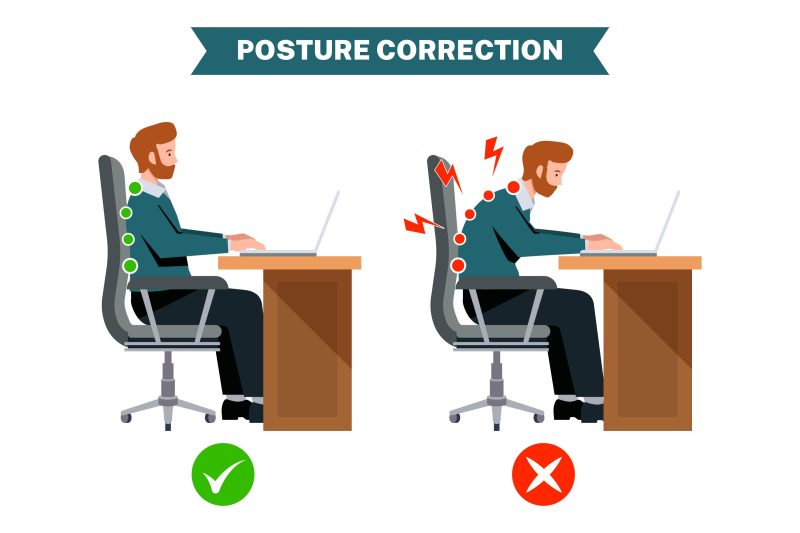
Optimize Lumbar Support: Your lower back has a natural inward curve. Your chair must support this curve. If your chair lacks built-in support, use a specialized lumbar cushion or a rolled-up towel placed securely at your lower back.
-
Seat Depth: Ensure there is a small gap (about the width of two to three fingers) between the back of your knees and the edge of the seat to promote proper blood circulation.
2. Strategic Screen Placement for Cervical Health
“Tech neck” is a condition caused by constantly looking down at a monitor or laptop. For every inch your head tilts forward, the weight borne by your cervical spine practically doubles.
How to fix it:
-
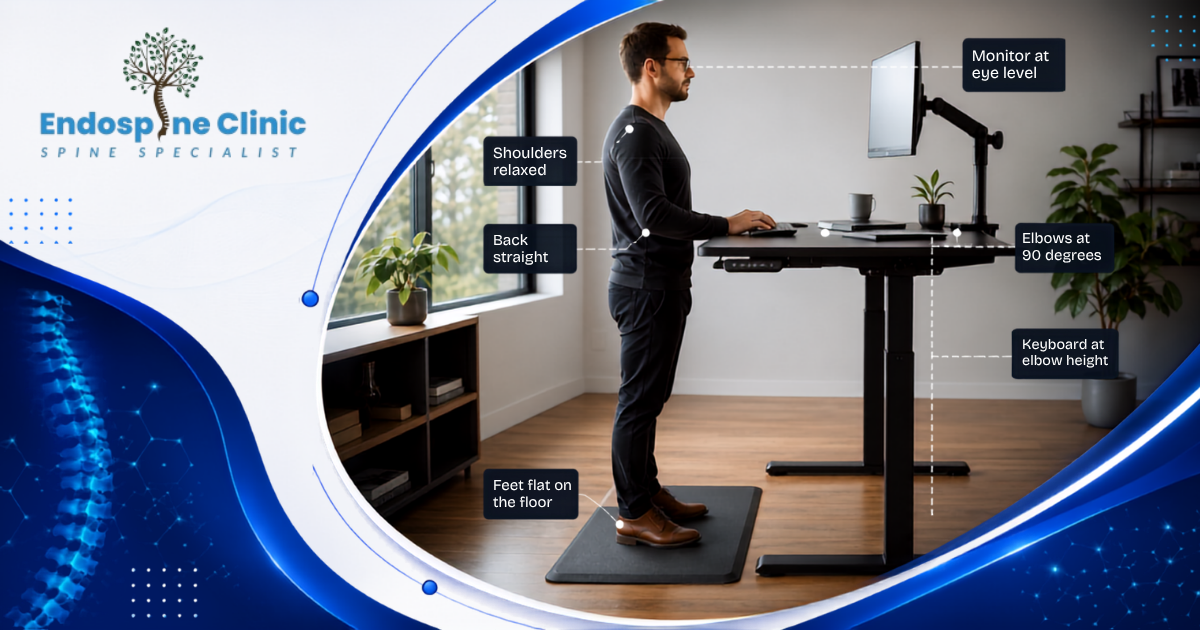
Eye Level is Key: The top third of your computer monitor should be exactly at your eye level when you are sitting up straight.
-
Arm’s Length Away: Position the monitor about an arm’s length (20 to 24 inches) away from your face.
-
Center the Screen: Place the primary monitor directly in front of you. Constantly twisting your neck to view an off-center screen will lead to asymmetrical muscle strain.
-
Dual Monitors: If you use two monitors equally, center the seam between them. If you use one primarily, place it directly in front and the secondary one immediately adjacent, angled slightly toward you.
3. Perfecting Your Desk Posture
Even with the best chair and screen setup, bad postural habits will still lead to desk job spine pain. Conscious postural correction is an ongoing daily practice.
How to fix it:
-
The 90-Degree Rule: Keep your elbows bent at a 90-degree angle and resting close to your body. Your forearms should be parallel to the floor.
-
Relax the Shoulders: Consciously drop your shoulders away from your ears. Shrugging while typing is a major cause of upper back and neck tension.
-
Neutral Wrists: Keep your wrists straight and floating gently above the keyboard. Avoid planting your wrists firmly on the desk edge while typing.
-
Avoid Crossing Legs: Crossing your legs twists your pelvis and misaligns your lower spine. Keep both feet planted to distribute your weight evenly.
4. The 20-20-20 Rule and Micro-Breaks
The human spine requires movement to stay lubricated and healthy. Prolonged static postures are incredibly damaging, regardless of how “perfect” your ergonomics are.
How to fix it:
-
The 20-20-20 Rule: Every 20 minutes, look at an object at least 20 feet away for 20 seconds. This relaxes your eye muscles and naturally prompts you to shift your neck and spinal posture.
-
Stand Up and Stretch: Set a timer to stand up every 30 to 45 minutes. Reach for the ceiling, perform gentle torso twists, and do a few shoulder rolls.
-
Hydration Station: Keep a small water glass at your desk instead of a large bottle. This forces you to get up and walk to the water cooler frequently.
-
Walking Meetings: Whenever possible, take phone calls or conduct informal meetings while pacing or walking.
When to See a Spine Specialist in Vadodara
While ergonomic adjustments can work wonders for muscular fatigue, they cannot cure underlying structural spine issues. Residents of Gujarat are increasingly prioritizing their spinal health, seeking out advanced medical infrastructure in major cities.
If your desk job spine pain persists for more than two weeks despite ergonomic changes, it is time to consult the best spine surgeon in Vadodara. You should book an immediate consultation if you experience “red flag” symptoms such as:
-
Radiating pain or severe weakness in your arms or legs.
-
Loss of bowel or bladder control (a medical emergency).
-
Unexplained weight loss accompanying your back pain.
-
Pain that is worse at night or disrupts your sleep completely.
Vadodara has emerged as a premier hub for orthopedic and spinal care. Patients across Gujarat prefer seeking spine treatment in Vadodara due to the city’s highly accessible, world-class medical facilities, high trust factors with seasoned specialists, and significantly lower wait times compared to metropolitan cities.
Advanced Spine Treatment in Vadodara
When you visit a top-tier clinic in the region, the focus is always on accurate diagnosis and patient-centric care. Advanced diagnostic tools like high-resolution MRIs and digital X-rays are standard practice.
Treatment options provided by a spine specialist in Vadodara generally fall into two categories:
1. Conservative, Non-Surgical Management: For the vast majority of IT professionals and desk workers, surgery is not required. Treatment plans usually involve customized physiotherapy, targeted spinal injections for inflammation relief, and medical management. Clinics in Vadodara boast state-of-the-art rehabilitation centers designed specifically for ergonomic recovery.
2. Minimally Invasive Spine Surgery (MISS): If structural damage like a severely herniated disc is compressing a nerve, surgery may be necessary. Fortunately, Vadodara is home to surgeons highly trained in minimally invasive techniques. These advanced procedures require smaller incisions, resulting in less tissue damage, minimal blood loss, and incredibly fast recovery times, allowing professionals to return to their desks safely and swiftly.
The Benefits of Timely Ergonomic Intervention
Addressing your desk habits and seeking timely medical advice yields lifelong benefits.
-
Enhanced Productivity: Living pain-free significantly boosts your focus, energy levels, and output at work.
-
Cost Savings: Investing in an ergonomic chair or a quick consultation today saves thousands in severe medical procedures or surgeries down the line.
-
Improved Quality of Life: Protecting your spine ensures you can enjoy your weekends, play sports, and lift your children without fear of throwing out your back.
-
Faster Recovery: Early intervention prevents minor muscle strains from turning into permanent joint degeneration.
Frequently Asked Questions (FAQs)
Q1: Can a bad office chair permanently damage my spine? Yes, consistently using a chair with poor lumbar support forces your spine out of its natural alignment. Over the years, this can lead to permanent structural issues, disc degeneration, and chronic desk job spine pain.
Q2: How do I find the best spine surgeon in Vadodara? Look for a board-certified specialist with extensive experience in both conservative management and minimally invasive procedures. Read patient reviews, check their hospital affiliations in Vadodara, and ensure they prioritize non-surgical treatments first.
Q3: Is standing all day better than sitting for my spine? Not necessarily. Standing all day can cause blood to pool in your legs and put excess pressure on your lower back and knees. The healthiest approach is alternating between sitting and standing every hour using a height-adjustable desk.
Q4: Will I definitely need surgery for my desk-related back pain? No. Over 90% of desk-related back pain cases can be completely resolved through ergonomic fixes, structured physiotherapy, and temporary medication. Surgery is only considered a last resort by a reputable spine specialist in Vadodara.
Q5: What is the most important ergonomic fix I can make today? Adjusting your screen height to eye level. This simple change instantly removes immense pressure from your cervical spine (neck) and forces your upper back to remain upright.
Conclusion & Call to Action
Your career shouldn’t come at the cost of your physical well-being. By taking control of your workstation geometry—optimizing your chair height, elevating your screens, and maintaining a neutral posture—you can effectively combat desk job spine pain. Remember, movement is medicine; incorporate those micro-breaks into your daily routine.
However, if ergonomic changes aren’t providing the relief you need, do not wait for the pain to become debilitating. Early diagnosis is the key to a fast, non-surgical recovery.
Are you tired of working through back pain? Take the first step toward a pain-free professional life today. Schedule a comprehensive consultation with the best spine surgeon in Vadodara. Let our expert team evaluate your spinal health and design a personalized, effective treatment plan tailored to your lifestyle. Contact us now to book your appointment!
